
📝Post 9-My Contribution to the WordPress Support Community
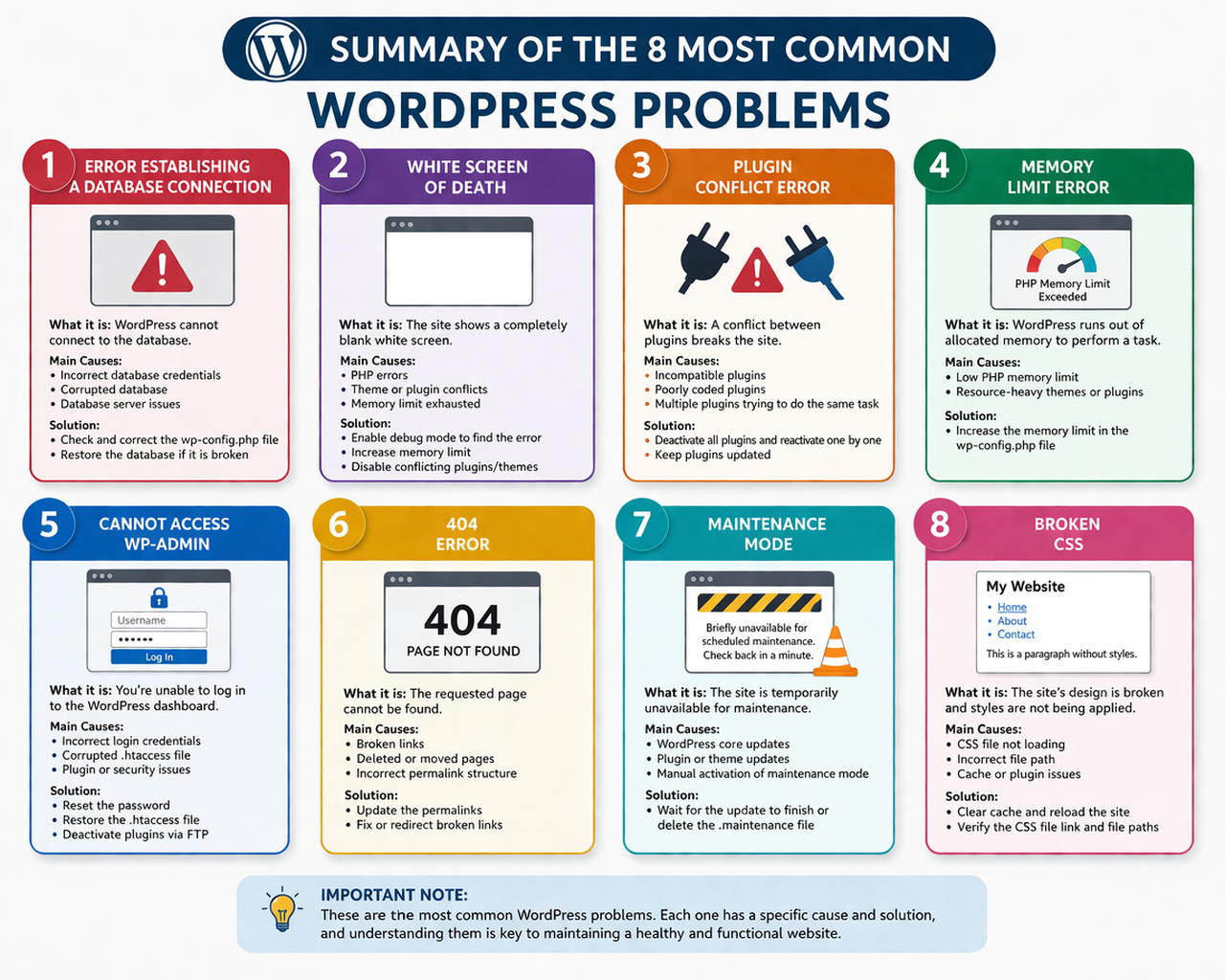
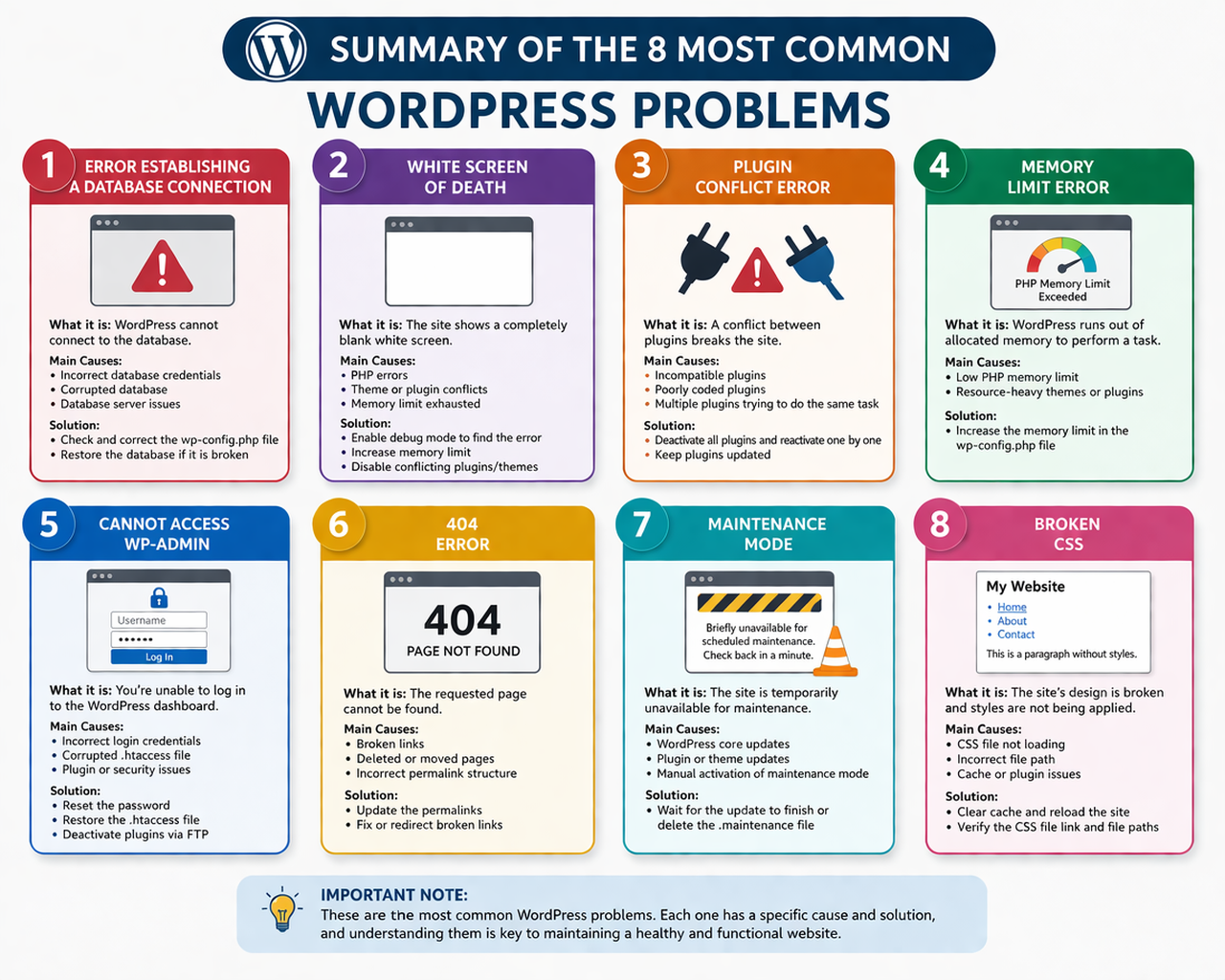
This project represents my contribution to the WordPress support community, where I worked on identifying, analyzing, and[…]
📝 Post 8 – Reflection and Learning
Throughout this project, I learned that troubleshooting is a critical skill in WordPress development. It is not[…]
📝 Post 7 – Final Result and Delivery
By the end of this project, I was able to analyze and understand several common WordPress errors.[…]
📝 Post 6 – New Action or Adjustment
After analyzing multiple errors, I decided to adopt a more structured approach to troubleshooting. In this phase,[…]
📝 Post 5 – Challenge or Turning Point
The biggest challenge I faced was analyzing errors that do not display any clear message, especially the[…]
📝Post 4 – Second Action and Progress
In this stage, I worked with errors such as the White Screen of Death and Plugin Conflict[…]
📝Post 3 – First Concrete Action
My first step was to research the “Error Establishing a Database Connection”, one of the most common[…]
📝 Post 2 – Configuration and Preparation
The first step was to establish a theoretical foundation that allowed me to analyze and understand errors[…]
📝Post 1 – Introduction and Starting Point
I chose to work on common WordPress errors because troubleshooting is one of the most essential skills[…]
Biography
My name is Mateo Rincón González, and I am currently a student with an interest in web development and technology. I am in the process of learning how to build and manage websites using WordPress, focusing on gaining practical experience through real projects.
This project represents part of my learning journey, where I explored common WordPress errors and how to solve them. Through research and hands-on practice, I have developed a better understanding of how websites work and how to troubleshoot common issues.
Although I am still a beginner in WordPress, I am motivated to continue improving my skills, learning new tools, and expanding my knowledge in web development. My goal is to keep growing professionally and apply what I learn in future projects.
Objectives of my contribution
The main objective of this project is to identify, analyze, simulate, and solve the most common errors in WordPress through a practical and hands-on approach, in order to understand their causes, effects, and possible solutions within a real web environment.
This project aims to strengthen technical skills in web development by working directly with a WordPress installation, allowing the identification of common issues that may affect the functionality, performance, and accessibility of a website. Through the implementation of each error and its corresponding solution, the project seeks to provide a clearer understanding of how WordPress operates and how to troubleshoot effectively.
Additionally, this work focuses on developing problem-solving abilities, encouraging the application of theoretical knowledge in real scenarios, and documenting each process as evidence of learning. Overall, the project contributes to gaining practical experience and building confidence in managing and maintaining WordPress-based websites.
My WordPress Profile
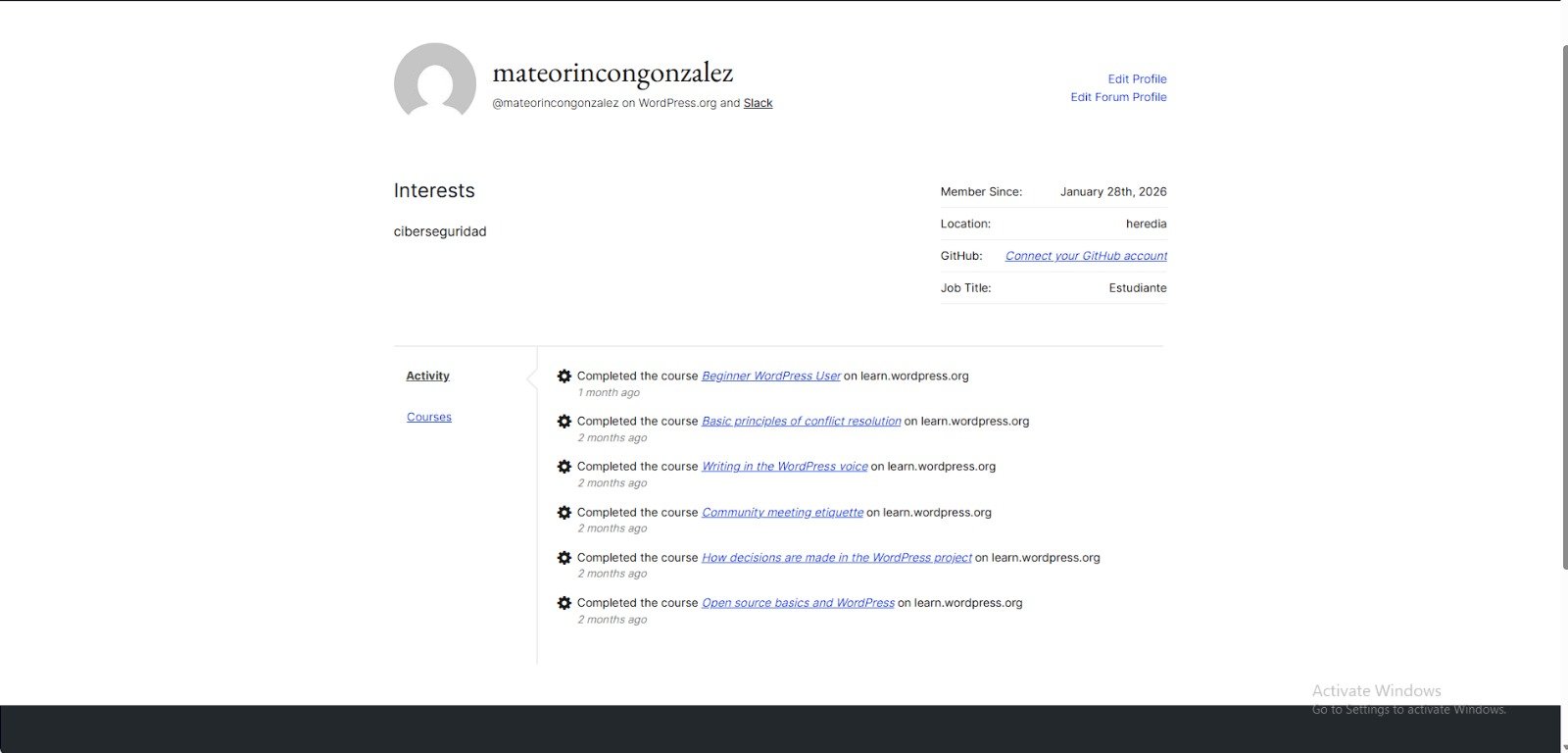
This is my WordPress profile, where I have developed and documented practical solutions to some of the most common errors in WordPress. Through this project, I have applied my knowledge in a real environment, focusing on problem-solving and continuous learning.
Profile Link:mateorincongonzalez (@mateorincongonzalez) – WordPress user profile | WordPress.org
Work Plan / Methodology
This project was developed using a research-based and practical approach, focused on understanding, analyzing, and explaining the most common errors in WordPress.
First, a WordPress website was created as a base platform to organize and present all the information. This site served as a structured environment where each error could be documented clearly and accessed easily. Basic configurations such as themes, pages, and menus were implemented to build the foundation of the project.
Next, a detailed investigation was carried out using reliable online sources, including technical blogs, documentation, and tutorials related to WordPress. Through this research process, the most common errors were identified, selected, and analyzed based on their relevance and frequency.
Each error was then studied individually in order to understand its causes, how it affects the website, and the most effective ways to solve it. Instead of generating all errors manually, the project focuses on explaining real-world scenarios based on documented cases and practical examples found during the research.
After that, each error was developed into a separate page within the website. These pages include a clear description, possible causes, step-by-step solutions, and visual references to help illustrate how the error appears and how it can be fixed.
Finally, all the content was organized into a main page that connects each case, allowing users to navigate easily through the different errors. This structure provides a clear and educational guide, making the project useful for beginners who are learning how to manage and troubleshoot WordPress websites.
References
The information presented in this project was gathered from multiple reliable online sources related to WordPress, web development, and troubleshooting. These sources include official documentation, technical blogs, and educational platforms that explain common WordPress errors and their solutions.
The research focused on identifying real-world issues frequently encountered in WordPress environments, as well as understanding their causes and applying effective solutions.
The main sources consulted include:
Official Documentation:
https://wordpress.org/documentation/
https://developer.wordpress.org/advanced-administration/wordpress/common-errors/
Tutorials and Guides:
https://www.wpbeginner.com/
https://www.hostinger.com/tutorials
https://supporthost.com/
https://managewp.com/wordpress-errors/
Additional Learning Resources:
https://acclaim.agency/blog/troubleshooting-common-wordpress-issues-a-guide-for-website-owners
https://dev.to/anemnavinrao/common-wordpress-errors-and-how-to-fix-them-like-a-pro-318l
https://user-meta.com/tag/fix-white-screen-problem/
These sources were used to understand the causes, behavior, and solutions of the most common WordPress errors, including database connection issues, plugin conflicts, memory limits, access problems, 404 errors, maintenance mode, and CSS-related issues.