
Plugin Conflict
Introduction:
WordPress allows the use of multiple plugins to extend the functionality of a website, but this flexibility can sometimes lead to compatibility issues. When plugins conflict with each other or with the active theme, they can cause errors, affect performance, or even make the website inaccessible. Understanding how to detect and resolve these conflicts is essential for maintaining a stable and functional site.
Error Name:
Plugin Conflict Error
Description:
This error occurs when one or more plugins are incompatible with each other or with the active theme, causing the website to malfunction, display errors, or completely crash. In some cases, the admin panel may also become inaccessible.
Causes:
- Incompatibility between two or more plugins
- Outdated plugins that are not compatible with the current WordPress version
- Poorly developed plugins with coding errors
- Conflicts between plugins and the active theme
About the event
Solution:
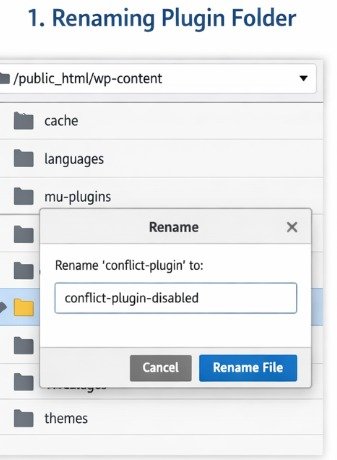
- Access the website files using FTP or File Manager.
- Navigate to the following directory:
/wp-content/plugins/ - Rename the folder of the suspected plugin (for example: plugin-name → plugin-name-disabled).
- Reload the website to check if the issue is resolved.
- If the site works again, reactivate plugins one by one from the admin panel to identify the exact conflicting plugin.
- Update, replace, or permanently remove the problematic plugin.
Implementation:
A conflicting plugin was intentionally installed to generate the error. Then, the plugin folder was manually renamed from the file manager, which immediately restored the website functionality. After that, plugins were tested individually to confirm the source of the conflict.ed from the file manager, which immediately restored the website functionality. After that, plugins were tested individually to confirm the source of the conflict.
What I Learned:
Through this exercise, I learned that plugin conflicts are a common cause of errors in WordPress, especially when using outdated or poorly developed plugins. I understood how incompatibilities between plugins or with the active theme can break the website or even block access to the admin panel.
I also gained practical experience in resolving these issues by accessing the file system through FTP or File Manager and manually disabling plugins by renaming their folders. This technique is especially useful when the admin panel is not accessible.
Additionally, I learned the importance of testing plugins one by one to accurately identify the source of the conflict, as well as keeping plugins updated and choosing reliable ones to avoid future problems.
Finally, by intentionally creating and resolving the conflict, I improved my troubleshooting skills and developed a clearer understanding of how different components in WordPress interact with each other.


Proudly powered by WordPress